
Command Management
TicketForge offers granular control over Slash Commands. You can disable specific commands entirely or restrict them to specific channels and roles.
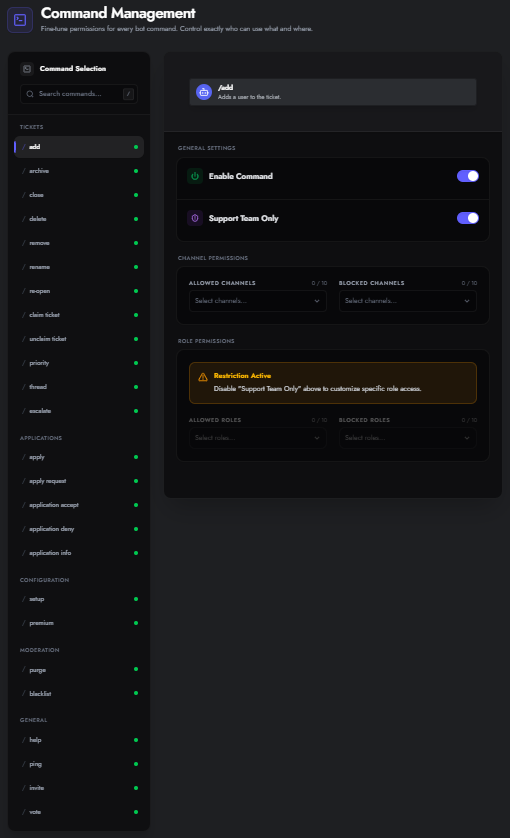
Configuration
Section titled “Configuration”Navigate to the Commands tab in the sidebar. You will see a list of all available bot commands.
Command Settings
Section titled “Command Settings”Click on any command to edit its permissions:
- Enable Command: Master toggle. If OFF, the command acts as if it doesn’t exist.
- Support Team Only: Restricts usage to users who have a role designated as “Support” in any of your panels.
- Admin Commands (e.g.,
/setup,/purge-tickets) are restricted to Administrators automatically.
- Admin Commands (e.g.,
Scope Restrictions
Section titled “Scope Restrictions”You can fine-tune where commands work:
- Allowed Channels: The command will only work in these channels.
- Blocked Channels: The command will work everywhere except these channels.
- Allowed Roles: Only these roles can use the command.
- Blocked Roles: These roles are specifically prevented from using the command.
Available Commands
Section titled “Available Commands”Syntax Legend:
<required option>|[optional option]
| Command | Description |
|---|---|
| Tickets | |
/add [user] [role] |
Adds a user or role to the current ticket channel. |
/remove [user] [role] |
Removes a user or role from the current ticket channel. |
/rename <name> |
Renames the current ticket channel. |
/close [reason] |
Closes the current ticket with an optional reason (max 256 chars). |
/reopen |
Re-opens the current closed ticket channel. |
/delete |
Permanently deletes the current ticket channel. |
/claim |
Claims the current ticket for the executing staff member. |
/unclaim |
Unclaims the current ticket, releasing it back to the general staff pool. |
/archive |
Generates a standalone HTML transcript of the current ticket. |
/priority <level> |
Sets the priority level. Choices: low, medium, high, urgent. |
/thread |
Creates a private staff discussion thread inside the current ticket. |
/escalate [reason] |
Moves the current ticket to another panel/department. |
| Applications | |
/apply |
Opens an interactive form to start a new application in the server. |
/apply-request <user> <application> [reason] |
Sends an application prompt directly to a specific user’s DMs. |
/application-info <application> |
View detailed applicant answers, status, and metadata for a submission. |
/application-accept <application> [reason] |
Accepts a user’s pending application and runs assigned role automations. |
/application-deny <application> [reason] |
Denies a user’s pending application and notifies the applicant. |
| Configuration | |
/setup |
Configure and manage ticket panels for this server directly in Discord. |
/premium |
Check the server’s subscription status, active plan, and benefits. |
| Moderation | |
/blacklist <user> [reason] |
Blacklists a user. If used inside a ticket, it automatically transcribes and deletes it. |
/purge-tickets [age] |
Bulk deletes tickets by age. Choices: all (Everything), 1 (24h), 3 (3d), 7 (1w), 30 (1mo). |
| General | |
/help |
Provides information about the bot and its commands. |
/ping |
Checks bot latency and replies with Pong! |
/invite |
Get links to invite the bot or join the support server. |
/vote |
Vote for TicketForge on bot lists to support us and earn rewards. |