You can use dynamic variables in your Messages, Embeds, and Channel Names. The bot will automatically replace them with real data when the message is sent, the channel is created, or the application is processed.
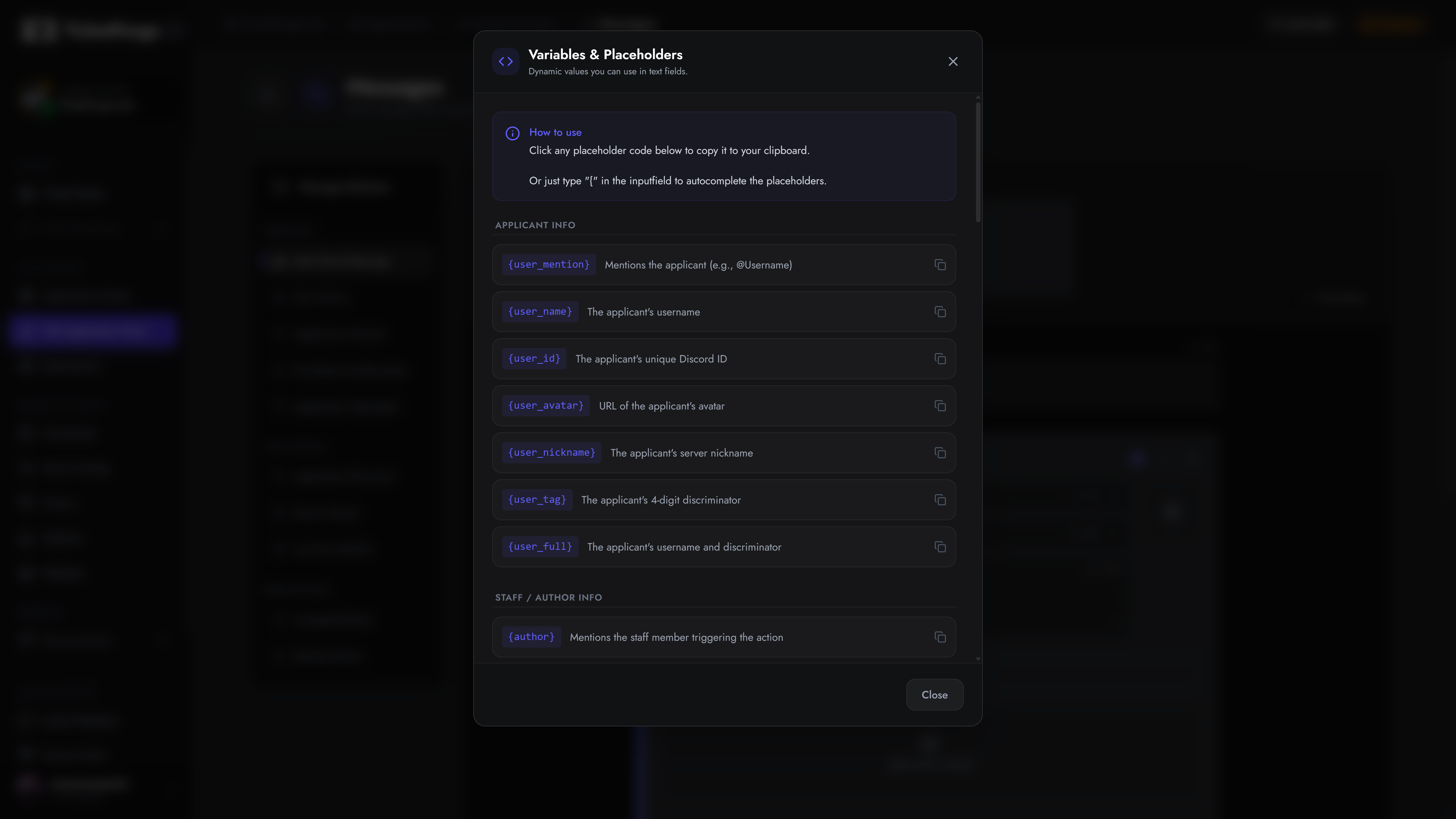
Before using variables, it is crucial to understand the difference between the User and the Author in TicketForge.
- The User (
{user_*}): The person who owns the object.
- In a Ticket, this is the person who opened the ticket.
- In an Application, this is the applicant.
- The Author (
{author.*}): The person who triggered the current action.
- If the user clicks “Start Application”, the user is the author.
- If a Staff member clicks “Accept”, the staff member is the author.
These variables are specifically available within the Application Editor > Messages section (e.g., Application Received, Accepted/Denied notices).
| Placeholder |
Description |
{application.name} |
The name of the application panel (e.g., “Staff App”). |
{application.results} |
The fully formatted list of questions and answers submitted by the applicant. |
{application.conclusion} / {conclusion} |
The final status (e.g., “Accepted” or “Denied”). |
{application.reason} / {reason} |
The reason provided by staff when accepting/denying. |
{deadline} |
The calculated deadline time (if a time limit was set). |
Used in Review Results and DM Notifications.
| Placeholder |
Description |
{review_action} |
The action in lowercase (e.g., “accepted” or “denied”). |
{review_action_title} |
The action in title case (e.g., “Accepted” or “Denied”). |
{review_action_time} |
The Unix timestamp when the review was completed. |
{review_reason} |
The sanitized reason shown on the staff review result. |
{application.handled_by} / {handled_by} |
The staff member who reviewed the application. |
{reviewer} |
Mentions the staff member who reviewed the application. |
{reviewer.name} |
The reviewing staff member’s username. |
{reviewer.icon} |
URL of the reviewing staff member’s profile picture. |
These variables are available within the Panel Editor > Messages section for standard Tickets.
| Placeholder |
Description |
{ticket} |
Mentions the ticket channel (clickable link). |
{ticket.name} |
The name of the ticket channel. |
{ticket.id} |
The unique channel ID of the ticket. |
{ticket_opener} |
Mentions the user who opened the ticket. |
{ticket_closer} |
Mentions the user who closed the ticket. |
{close_reason} / {ticket.close_reason} |
The reason provided when the ticket was closed. |
{transcript.users} / {transcript_users} |
List of users involved in the ticket transcript. |
| Placeholder |
Description |
{claim.user} |
Mentions the last user who claimed the ticket. |
{claim.user.name} |
The claimer’s username. |
{claim.user.icon} |
URL of the claimer’s profile picture. |
| Placeholder |
Description |
{escalate.reason} |
The reason provided for the escalation. |
{escalate.panel} |
The name of the destination panel. |
{escalate.staff} |
The staff member who escalated the ticket. |
Used to extract specific answers when creating a ticket via a form.
| Placeholder |
Description |
{create.form_0} |
The answer to the 1st question in the form. |
{create.form_1} |
The answer to the 2nd question in the form. |
{create.form_X} |
Replace X with the question index (starting at 0). |
These variables can be used globally across both Tickets and Applications.
| Placeholder |
Description |
{user_mention} |
Mentions the user/applicant (e.g. @Username). |
{user_name} |
The user/applicant’s username. |
{user_nickname} |
The user/applicant’s server nickname. |
{user_id} |
The user/applicant’s unique Discord ID. |
{user_avatar} |
Direct URL to the user/applicant’s avatar. |
{author} |
Mentions the action author (staff or user). |
{author.name} |
The author’s username. |
{author.id} |
The author’s unique Discord ID. |
{author.icon} |
URL of the author’s profile picture. |
| Placeholder |
Description |
{server.name} / {server_name} |
The name of the Discord server. |
{server.id} / {server_id} |
The server’s unique ID. |
{server_members} |
Total member count of the server. |
{server.icon} |
Direct URL to the server’s icon. |
{server.banner} |
Direct URL to the server’s banner. |
{channel_mention} |
Mentions the current channel. |
{channel.name} / {channel_name} |
The name of the current channel. |
{channel.id} / {channel_id} |
The ID of the current channel. |
| Placeholder |
Description |
{time} |
Current Unix timestamp in seconds. |
<t:{time}> |
Discord’s dynamic timestamp (auto-adjusts to the viewing user’s timezone). |
{time.created} |
Unix timestamp for when the ticket/app was created. |
{time.deleted} |
Unix timestamp for when the ticket/app was deleted. |
{time.created.age} |
How long ago the ticket/app was created. |
| Placeholder |
Description |
{empty} |
Inserts an empty-like invisible character. Useful for required embed fields. |
{random} |
Generates a random number (can be customized with ?rmin/?rmax modifiers). |
{Role ID} |
Pings a specific role. Replace Role ID with the actual ID (e.g., {9876543210}). |
These variables are strictly tailored for generating dynamic Ticket Channel and Thread names in the Panel settings.
| Placeholder |
Description |
{user} |
The ticket opener’s username (alias for {ticket.user.name}). |
{count} |
The unique, incrementing ticket number for this server. |
{panel.name} |
The name of the panel used to create the ticket. |
{panel.count} |
The sequential ticket number strictly for this specific panel. |
You can append modifiers to almost any variable to change how it is formatted or displayed.
Syntax: {variable?modifier}
| Modifier |
Alias |
Example |
Result / Description |
| Uppercase |
?uc |
{user_name?uppercase} |
JOHN |
| Lowercase |
?lc |
{user_name?lowercase} |
john |
| Max Length |
?ml=X |
{ticket.id?maxLength=5} |
12345 (truncates if exceeded) |
| Pad Left |
?pl=X |
{count?padLeft=4} |
0005 (adds leading zeros) |
| Pad Right |
?pr=X |
{count?padRight=4} |
5000 (adds trailing zeros) |
| Fallback |
?fb=Text |
{claim.user?fallback=Unclaimed} |
Displays “Unclaimed” if variable is empty. |
| Not Fallback |
?nfb=Text |
{claim.user?nfb=Claimed!} |
Displays “Claimed!” only if the variable contains data. |
| Math |
?m=op |
{count?math=+1} |
Performs algebraic operations (+, -, *, /). |
| Clean |
(None) |
{create.form_0?clean} |
Removes backticks to prevent markdown breaking. |
| Random Min |
?rmin=X |
{random?rmin=10} |
Sets the minimum bound for a random number. |
| Random Max |
?rmax=X |
{random?rmax=100} |
Sets the maximum bound for a random number. |
When setting up embeds requiring Image URLs (like Thumbnails, Author Icons, or Image properties), ensure you use variables that resolve to a valid direct image URL:
{user_avatar}{author.icon}{reviewer.icon}{ticket.user.icon}{claim.user.icon}{server.icon}{server.banner}