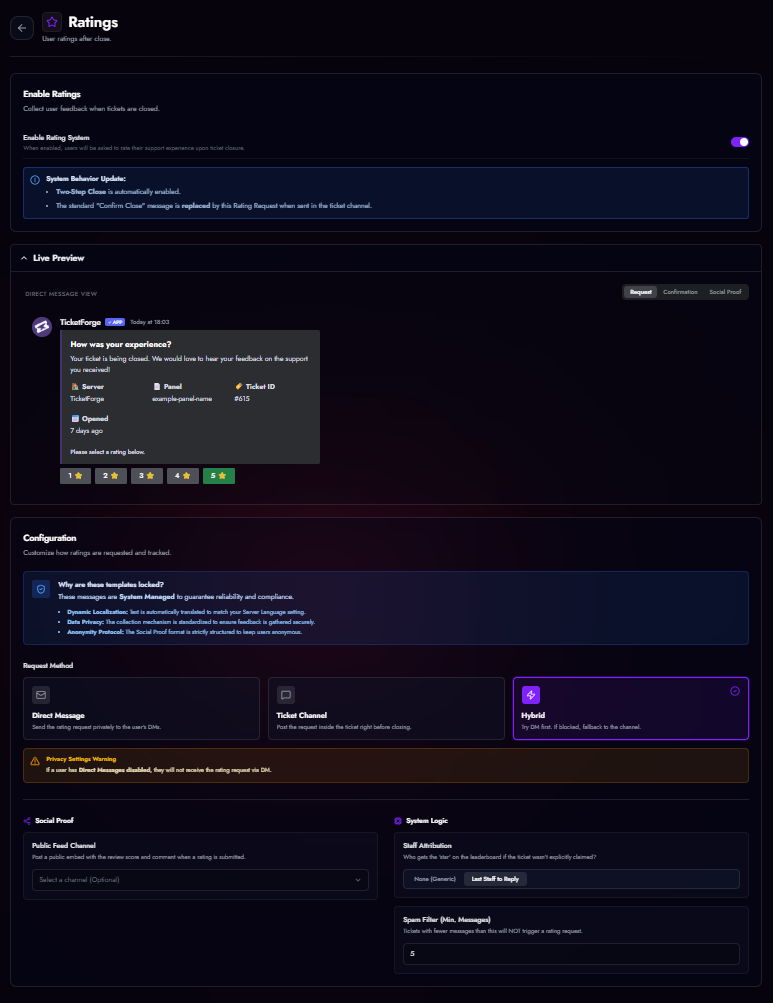
Rating System (CSAT)
Gather feedback on your support team's performance by asking users to rate their experience after a ticket concludes.
Configuration
- Go to the Rating System tab in the Panel Editor.
- Enable the system.
Two-Step Close
Enabling the Rating System automatically forces Two-Step Close (Confirmation Mode). The rating request replaces the standard "Confirm Close" prompt.
Request Methods
You can choose how the user is asked for feedback:
- Ticket Channel (Recommended): The bot posts an embed with 1-5 Star buttons inside the ticket channel.
- Direct Message: The bot DMs the user with the rating request.
- Hybrid: Tries to DM the user first; if DMs are closed, it posts in the channel.
Social Proof (Public Feed)
You can select a Public Feed Channel (e.g., #reviews). When a user submits a 4 or 5-star rating, the bot will automatically post a standardized "Review Card" in that channel to showcase your community's satisfaction.
Analytics
All ratings are aggregated in the Statistics page.
- CSAT Score: Average star rating (1.0 - 5.0).
- NPS (Net Promoter Score): Calculated based on the ratio of Promoters (5 stars) vs Detractors (1-3 stars).
- Staff Leaderboard: See which staff members are receiving the highest ratings (based on who claimed the ticket or replied last).