Skip to content

Limits & Schedules

Control the flow of tickets to prevent spam and ensure your team only receives requests when they are available.

Ticket Limits

You can cap the number of tickets to prevent abuse.

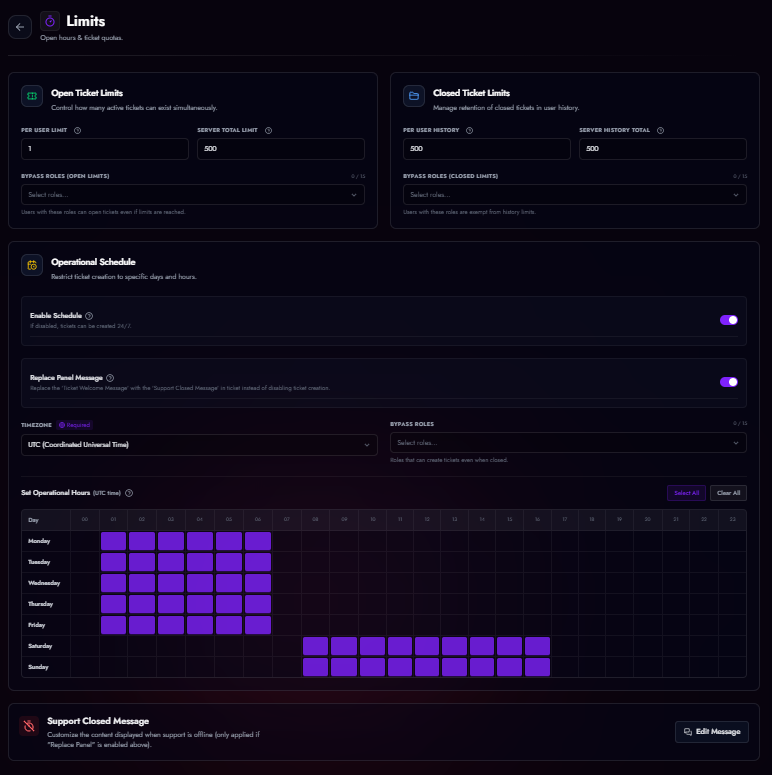
Limits Configuration

Setting user and server-wide ticket caps.
Limit Type Description
Per User Limit Max active tickets a single user can have open simultaneously (Default: 1).
Server Total Limit Max active tickets allowed for the entire server (e.g., 50).
History Limit How many closed tickets are kept in the database for history lookup before old ones are rotated out.

Bypass Roles

Assign specific roles (e.g., "VIP", "Server Booster") that can ignore these limits and open tickets regardless of the cap.


Operational Schedule

Define your support hours to manage user expectations.

Schedule Grid

The interactive weekly grid. Blue indicates open hours.
  1. Timezone: Set your server's local timezone.
  2. Weekly Grid: Click on hour blocks to toggle them Open (Blue) or Closed (Grey).
  3. Bypass Roles: Select roles that can open tickets even when support is closed (e.g., "Emergency").

Closure Behavior

When a user tries to open a ticket outside of operating hours:

  • Disable Button (Default): The user receives a hidden error message saying support is closed. The ticket is not created.
  • Replace Message: The ticket IS created, but instead of the standard "Welcome Message", a specific "Support Closed Message" is sent. This is useful if you want to allow users to leave a message for the morning shift.