Custom Forms (Modals)
Instead of creating a ticket immediately, you can require users to fill out a form (Modal) first. This helps your team get context before starting the conversation.
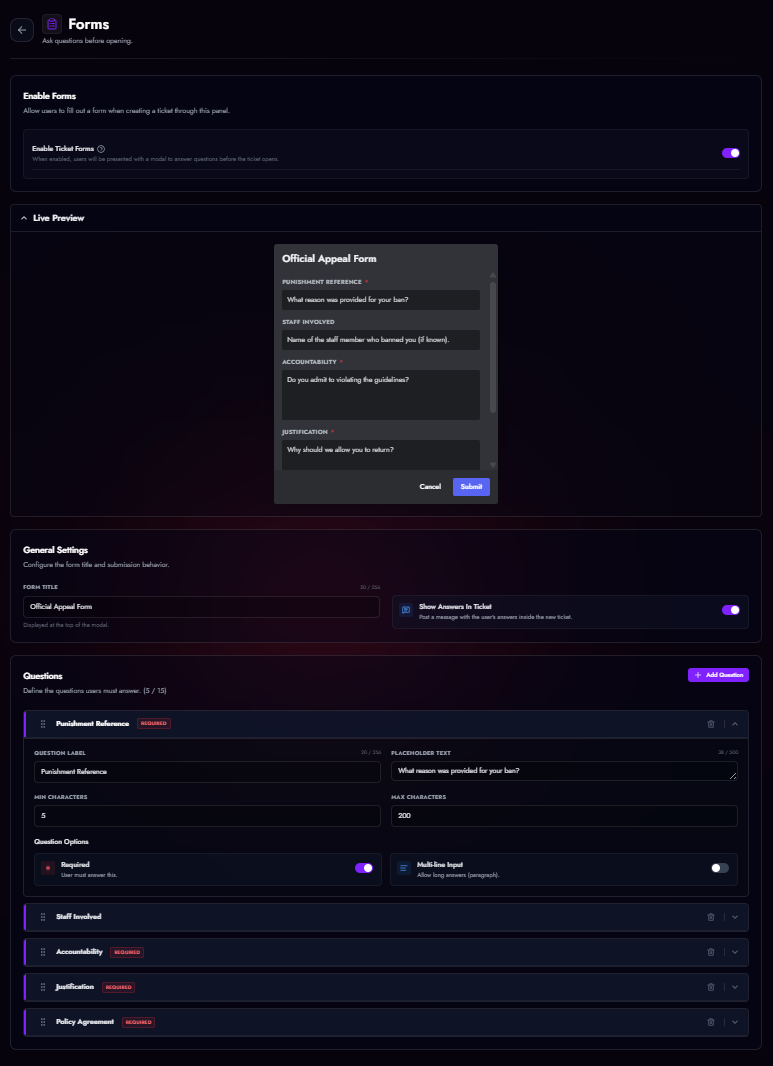
Configuration
- Navigate to Panel Editor > Forms.
- Toggle Enable Ticket Forms.
- Click Add Question.
Question Types
| Setting | Description |
|---|---|
| Label | The question text (e.g., "What is your Minecraft Username?"). |
| Placeholder | Grey text inside the input box to guide the user. |
| Required | Users cannot submit the form without answering this. |
| Multi-line | Switches from a small input box to a large text area (Paragraph). |
| Min/Max Length | Enforce character limits for answers. |
Results
When a user submits the form: 1. The ticket is created. 2. The bot posts an embed containing all their answers. 3. (Optional) Staff can edit these answers later if needed.